
Official release asset
Windows x64
Extract the ZIP, then run AssetRipper.exe.
Start with AssetRipper Download for Windows, macOS, or Linux, then follow a practical Unity asset workflow from the first launch to the final export.
Independent community resource · download links point to official GitHub release assets
Stable is the recommended starting point. Select a platform below to review the official 2.0.0 release archive.
Extract the ZIP, then run AssetRipper.exe.
Use this build on a Windows ARM64 device.
Use this build on Intel Macs; macOS may ask you to approve the first launch.
Use this native build on Apple Silicon Macs.
Extract the archive and run the AssetRipper binary from a terminal.
Use this build on a Linux ARM64 device.
✓Release version, filename, platform, and byte size come from the official source. Direct asset probing succeeded for Linux ARM64; use the release-page fallback when a CDN check is unavailable.
AssetRipper is distributed as platform-specific archives. Windows users normally choose x64, Apple Silicon Macs use ARM64, Intel Macs use x64, and Linux users should match the architecture reported by their distribution.
| Platform | Architecture | File | Size | Action |
|---|---|---|---|---|
| WindowsRecommended | x64 | AssetRipper_win_x64.zip |
42.4 MB | Release assets |
| Windows | ARM64 | AssetRipper_win_arm64.zip |
40.5 MB | Release assets |
| macOS | Intel | AssetRipper_mac_x64.tar.xz |
30.1 MB | Release assets |
| macOS | Apple Silicon | AssetRipper_mac_arm64.tar.xz |
25.9 MB | Release assets |
| Linux | x64 | AssetRipper_linux_x64.tar.xz |
29.4 MB | Release assets |
| Linux | ARM64 | AssetRipper_linux_arm64.tar.xz |
26.2 MB | Download |
AssetRipper is portable in the usual desktop workflow: download the archive, extract it to a folder you control, start the application, and load files from a game or project you are authorized to inspect. The export step creates a new output directory, so keep the original source files untouched.
Unzip the official archive into a short, writable folder. Avoid running directly inside the compressed ZIP.
Open the platform executable. On macOS or Linux, follow the platform guide if the operating system blocks the first launch.
Point AssetRipper at an authorized Unity game folder, asset bundle, serialized file, or other supported input.
Choose a Unity Project, Primary Content, or selected asset export depending on what you need to inspect.
Write the result to a separate destination, then inspect materials, meshes, textures, scenes, and scripts for missing dependencies.
AssetRipper is an open-source Unity asset extraction and project reconstruction tool. It is commonly used by developers, technical artists, researchers, preservation teams, and authorized modding communities that need to inspect Unity serialized files or recover usable project data from a local build. It is not a magic converter for every game file, and it does not make copyrighted content yours to redistribute.
The practical value of AssetRipper is that it turns a difficult file-format investigation into a visible workflow. Instead of opening each binary file by hand, you can load a folder or bundle, review the assets AssetRipper recognizes, choose an export mode, and inspect the generated project or primary content. The result still depends on the source files, the Unity version, scripting backend, compression, encryption, and dependencies present in the input.
This site answers the questions people ask before downloading: which file to choose, how to run AssetRipper on macOS, why the window says no files loaded, what Unity version support means, and why an exported GLB or project can be empty. The guides connect the download decision to the next useful task instead of treating the ZIP as the whole product.
Export choices are a workflow decision, not a promise that every source asset will survive unchanged. Start with the smallest output that answers your question and keep the original files available for another pass.
Use this when you want a project-shaped result for inspection or further editing in Unity. Expect missing scripts, broken references, and version-specific cleanup in complex projects.
Use this for a focused export of recognized assets. It is often easier to review when you need a texture, mesh, audio clip, prefab, or a small group rather than a complete reconstruction.
Useful for viewing geometry outside Unity, but empty or incomplete results can happen when a mesh depends on unsupported shaders, stripped data, missing textures, or an unusual asset type.
Textures, sprites, materials, scenes, animation clips, and prefabs may be available as separate content types. Filter the export when a full project would be unnecessarily large.
Unity files are version-sensitive. A file made with an older Unity release may load cleanly while a newer or customized build may expose warnings, missing types, or partial data. The Unity version shown in a file or player build is a useful clue, but it is not a guarantee that every asset will export perfectly.
For Unity 6 and other recent versions, use the current official release first and read the project documentation or release notes when the parser reports an unsupported version. If the application opens but a file is not recognized, test a smaller known-good input, confirm that you selected the correct folder level, and check the troubleshooting guide before assuming the entire game is incompatible.
AssetRipper is also different from a Unity editor importer. It can reconstruct useful project data, but the exported folder may need a matching Unity editor, package cleanup, shader replacement, or manual reference repair before it behaves like the original project.
Version, dependency, shader, and platform details affect the final result.
AssetRipper Wiki does not host cracked builds, premium torrents, game assets, or third-party mirrors. The download buttons on this page point to the official AssetRipper GitHub release assets that were checked for the expected version and ZIP response. A reachable file is not the same as an absolute safety guarantee, so you should still use your normal device security controls and confirm that the source is the official repository.
Only inspect files you own, created, are preserving with permission, or are otherwise authorized to analyze. This guide does not explain how to bypass encryption, anti-cheat, paid access, DRM, or copyright protections. AssetRipper can help with technical inspection; it does not grant permission to publish, sell, or redistribute extracted game content.
Read download and legal notesThe official AssetRipper repository includes a macOS walkthrough. Its screenshots show the extracted application folder and the terminal command used to make the binary executable. On some macOS versions, Gatekeeper can also warn about a downloaded library. Use the platform guide for the exact next step instead of deleting files at random.
Source: AssetRipper GitHub documentation · view source
Read the macOS guide Read the Windows guide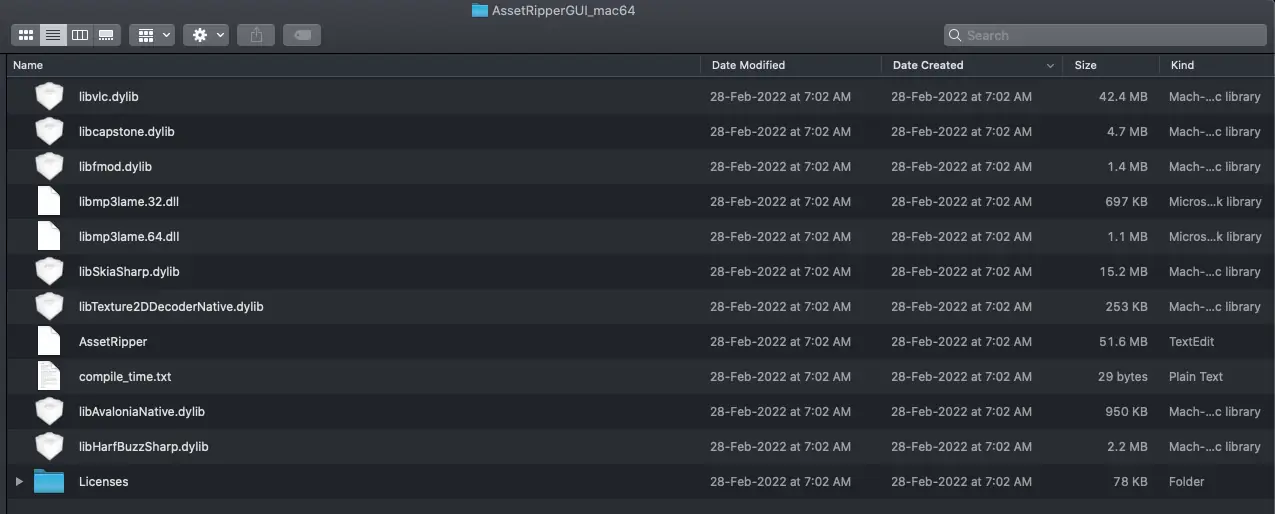
The release data on this page currently lists AssetRipper 2.0.0 as the stable build checked on September 15, 2026. Always use the official releases page as the final source when a newer tag appears.
Most Windows PCs use AssetRipper_win_x64.zip. Choose the ARM64 archive only when Windows reports an ARM64 device or you specifically need that native architecture.
An APK is a container, not a guarantee that every contained Unity file will load. You may need to extract or inspect the relevant Unity data first, and some mobile builds use IL2CPP, encryption, compression, or custom packaging that limits recovery.
AssetRipper's common workflow is Unity Project, Primary Content, and supported model or GLB exports. If you need FBX specifically, export a usable model format first and use an appropriate authorized conversion workflow.
The selected path may be the wrong folder level, the files may be unsupported or encrypted, or the source may not contain Unity serialized data where expected. The troubleshooting page gives a short symptom-to-check sequence.
Use the official repository or release assets, verify the version and filename, keep your security tools enabled, and treat extracted content as untrusted input. AssetRipper Wiki does not promise that every third-party file or extracted asset is safe.
Compatibility depends on the exact Unity file version and the current AssetRipper release. Use the latest official build, check the Unity guide, and read warnings rather than assuming a version label guarantees a complete export.
You choose an output location during the export workflow. Use a separate writable folder with enough free space, and do not overwrite the original game or project directory.
Start with the download page if you need a platform-specific archive, use the beginner guide if AssetRipper is open but unfamiliar, and open troubleshooting when the importer or exporter reports an error. The site is designed to keep those tasks connected so you can move from a verified official download to a clear, authorized Unity asset workflow.